
A little theatre for your GitHub tab.
You shipped it.
Take a bow.
Turn a merged pull request, green checks, or a new release into a moment worth watching.
Six themes. No sound. Always your call. Also on Firefox.
The whole show in under a minute
See what a merge
could feel like.
Read the transcript
Every merge you've ever done… deserved better.
Meet Footlit. GitHub, with stage lighting.
Pick a theme. Create a repo, and the show begins. Break the build, and the show stops.
Fix it. Merge it. Take a bow.
Eleven events. Six themes. Zero data leaves your browser.
Footlit. Free for Chrome and Firefox.
How it works
You do the work.
Footlit brings the applause.
You do the thing.
Merge a pull request. Publish a release. Create a repository. Nothing new to learn: you use GitHub exactly as before.
Footlit notices.
A small script on github.com reads the page labels, right in your browser. It watches for the change from “open” to “merged”, nothing else.
The show plays.
A full-screen moment in the theme you picked, then the page is yours again. Press Esc to skip it any time.
Your kind
of celebration.
A curtain call. An arcade victory. A quiet nod in the corner. Pick what feels like you.
Explore all six themesPull request merged.
Nice work. Give it a little Footlit.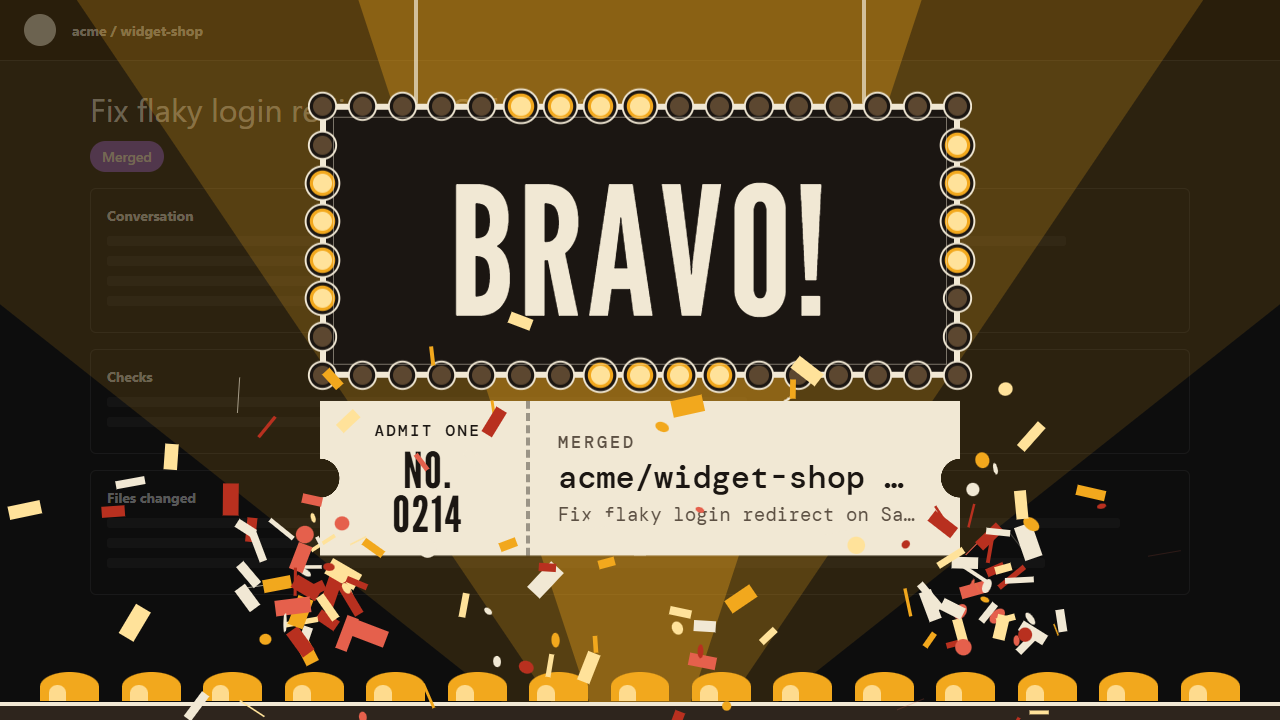
Eleven moments.
Each gets an entrance.
Applause when something goes right, a farewell when something ends, an alarm when it breaks.
Repositories
- Repo createdApplauseOpening night for something new.
- Repo deletedFarewellStrike the set.
- Repo forkedApplauseYour own copy, ready to bend.
Pull requests
- Pull request openedApplauseA conversation begins.
- Pull request mergedApplauseTwo branches, one story.
- Pull request closedFarewellNot every scene makes the cut.
Checks and deploys
- Checks passedApplauseThe green check, with feeling.
- Checks failedAlarmThe show stops.
- Site or deploy liveApplausePages goes up, curtain goes up.
Releases and issues
- Release publishedApplauseA tag worth a trumpet.
- Issue closedApplauseOne less thing on the list.
Safe by design
Your work stays yours.
One site.
Footlit runs on github.com and nowhere else. It never asks for “all websites”.
Nothing leaves your browser.
No account, no analytics, no servers of ours. Footlit makes no network requests of its own.
Always your call.
Switch events off one by one, pause everything for an hour with Quiet mode, or follow your system’s reduced-motion setting.
Take a seat
Install it in a minute.
Free, no account, no sign-up. Version 1.0.2.
- Price
- Free
- Works with
- Chrome 111+ and Chromium browsers; Firefox 140+
- Version
- 1.0.2
- Download
- 310 KB
- Data collected
- None
- Permissions
- github.com access and storage
Chrome, Firefox and friends
- Press “Add to Chrome” or “Add to Firefox” and confirm. The browser will say Footlit can read and change your data on github.com. That is standard wording for any extension that runs on a site: Footlit only runs on github.com, looks at page labels on your machine to know when something happened, and sends nothing anywhere.
- Reload any GitHub tab you already had open, click the Footlit icon, and press Rehearse on any event.
Brave and other Chromium browsers can install straight from the Chrome Web Store too. Store versions update themselves.
Manual install (zip)
Only needed if you cannot use a store.
- Download and unzip the file somewhere it can stay. Chrome loads the extension from that folder, so do not delete it afterwards.
- Open the extensions page by pasting into the address bar, then switch on Developer mode.
- Click “Load unpacked” and choose the unzipped folder. The folder you pick must be the one that contains
manifest.json. - Reload any GitHub tab you already had open, click the Footlit icon, and press Rehearse on any event.
Installed from a zip? Updates are not automatic. Browsers only update extensions that came from a store. When a new version is released, download the latest zip here, replace the files in your folder, then press the reload button on Footlit at and reload your GitHub tabs.
A few
good questions.
Is it really free?
Yes. Footlit is free, with no account, ads, or subscription.
Will it interrupt my work?
Shows are brief and never capture clicks. Escape dismisses them. You can switch off individual events, pause all shows for an hour, or choose the small Quiet theme. System reduced-motion preferences are respected by default.
What happens to my data?
Footlit has no telemetry or analytics. It reads GitHub page labels to detect events and keeps a short activity log on your device. Your browser may sync your preferences between devices if browser sync is enabled. Full privacy details.
Which browsers and sites are supported?
Chrome 111+ and Firefox 140+, on github.com. Install from the Chrome Web Store or Firefox Add-ons. GitHub Enterprise domains are not supported yet.
What if an animation does not play?
Reload your GitHub tab after installing. Check that Footlit and the event are enabled, then try Rehearse from the extension menu. Settings has an activity log for troubleshooting. GitHub page changes can affect detection; you can report a problem through the contact links below.